 939-836-9894

AquaStream’s Aquarium Fish Stocking Calculator helps you plan how many freshwater fish your tank can realistically support before stocking problems start.
Instead of relying on outdated rules, it checks the factors that matter in real tanks: adult fish size, waste level, behaviour, tank footprint, filtration, oxygen support, setup stability, maintenance habits, swim-zone pressure, and compatibility.
It also helps you review the result in a more practical way with a Simple or Detailed report view, profile guides, warnings, and shareable results.
Step 2: Filtration
⚙️ Advanced Inputs (Optional)Quick mode works with defaults. Open this only when you want a more tailored result.
Step 3: Add Fish
01. SYSTEM LIMITS & BREAKDOWN
02. BEST NEXT ACTIONS
03. SWIM-ZONE CHART
04. COMPATIBILITY CHART
05. ORIGIN MAP
06. FEED PROFILE GUIDE
08. RECOMMENDATIONS & WARNINGS
09. MY SAVED SETUPS
If you like it, please consider subscribing to my YouTube channel: Shifu Tanks and follow me on Instagram: @shifu_tanks to support a fellow hobbyist.
Version: 5.0.22 / Last Updated: [03-04-2026]

- Accurately determines the volume of an aquarium.
- Assists in selecting the correct filter size for optimal water quality.
- Essential for accurate dosing of medications and treatments.

- Optimise filter performance for clearer water.
- Ensure adequate oxygen distribution for fish health.
- Prevent dead zones and promote even nutrient distribution.

IMPORTANT NOTE: Read before you apply our recommendations!
Important: This tool is a planning guide, not a guarantee. Fish behaviour, feeding, plants, filter media, and maintenance habits change real-world outcomes. If you spot incorrect fish or filter data, email us at support@aquastream.in.
Start With Your Real Setup, Not a Guess
Enter your real tank size, filter setup, and fish list to get a more realistic stocking result for freshwater aquariums. In a few minutes, you can check:
- Stocking level for the selected rule
- Bioload based on adult size and waste
- Fish compatibility and shared water parameters
- Effective filter turnover
- Oxygen margin, including tighter night-time conditions
- Weekly water change guidance
- The main bottleneck limiting your setup
- Swim-zone pressure and habitat-style fit
- Feed and plant profile guidance for the selected stock
Use it before buying new fish, upgrading a filter, or deciding whether your current tank is already near the limit.
How Many Fish Can I Keep in My Tank?
There is no single perfect number because adult size, waste, behaviour, filtration, oxygen support, and swimming space matter more than fish count alone.
The safest approach is to enter your exact fish list and use the Modern result as the main planning view.
Quick guidance by tank size:
- 10–20L (2.5–5 gal): very limited stocking; stability is harder to maintain
- 40–60L (10–15 gal): better stability; small peaceful fish only
- 90–120L (24–32 gal): flexible community tanks if species are compatible
- 200L+ (50+ gal): more stable overall, but large fish still need space and strong filtration
If you’re new, aim for around 70–80% on the Modern rule and increase stock slowly.
Calculate Fish Bioload, Compatibility, Water Change & More
What you can review in seconds:
- Stocking level % (Modern + classic rules for comparison)
- Bioload score based on adult size and waste/behaviour
- Compatibility score based on temperament and parameter overlap
- Effective filter turnover
- Oxygen margin for day and tighter night-time conditions
- Weekly water change guidance
- Swim-zone pressure
- Biotope / habitat match
- The main bottleneck limiting the setup
- Practical next-step guidance if the plan looks risky
Database coverage (2026):
- 640 freshwater fish entries for more accurate stocking, compatibility, and parameter planning
- 406 aquarium filters with effective flow values for realistic turnover
- Expanded category coverage across cichlids, catfish, tetra, invertebrates, loaches, gouramis, snakeheads, plecos, rainbowfish, goldfish, gobies, and more
Plan a Safer Fish List for Your Freshwater Aquarium
Plan a safer, more balanced fish list using tank volume, tank footprint, adult size, temperament, oxygen support, and filtration turnover.
This calculator shows results using three stocking views:
- Modern (Balanced & Practical) – best for real freshwater planning
- UK old school (1 cm per litre) – shown for comparison
- 1 inch per gallon – a rough reference only, not final advice
It also helps you go beyond the stocking number by showing compatibility pressure, warnings, fish profile guidance, and practical improvements.
What the AquaStream Stocking Calculator Checks
1) Stocking level
The Modern method estimates load using adult size plus waste and behaviour factors, not just fish count. The older rules are shown for comparison only.
Quick interpretation:
- <80% = comfortable buffer (best for beginners)
- 80–100% = near the limit (needs consistency)
- >100% = higher risk (more maintenance/upgrade recommended)
Simple rule that prevents most problems: If you’re unsure, aim for 70–80% on the Modern rule, keep stable filtration, and increase stocking slowly over 2–6 weeks.
2) Filtration turnover
Turnover is calculated using effective flow, not just box-rated flow. The target turnover increases as stocking load increases (higher load = higher flow needed).
Filtration adequacy (quick check):
AqAdvisor-style tools commonly present filtration as a simple “is it enough?” score. As a rule of thumb:
- 100%+ = good baseline
- 80–99% = borderline (watch nitrates, consider upgrades)
- <80% = likely under-filtered for this stock
3) Compatibility score
A quick safety score based on temperament mix and overlap of core ranges (temperature, pH, hardness).
It’s a helpful warning system, not a guarantee.
Compatibility is driven by:
- temperament mix (peaceful vs semi-aggressive)
- schooling needs and space pressure
- overlap of temperature, pH and hardness (shared safe zone)
It’s a warning system, tank layout, hiding spots, and individual fish behaviour still matter.
4) Weekly water change suggestion
A practical weekly water change estimate based on stocking level, then adjusted by filtration performance (effective turnover).
If you feed heavily, keep messy fish, or run a new tank, treat the result as the minimum and go slightly higher.
Beginner-safe target (recommended):
- Aim for under 80% stocking if you’re new or if your tank is still stabilising.
- Only stock a fully cycled aquarium (0 ammonia, 0 nitrite).
- Add fish in stages over weeks, not all at once, so bacteria can adapt.

5) Oxygen margin
Oxygen support changes with temperature, surface movement, aeration, lid type, plant density, floating cover, and night-time setup behaviour.
6) Safety margin
This shows how forgiving the setup is if real-life conditions are not perfect. A lower safety margin means small mistakes can push the tank into stress faster.
7) Swim-zone use
Even when bioload looks acceptable, the fish mix may still feel crowded if too many species compete for the same swimming area.
8) Biotope match
This is a supporting indicator showing whether the selected species broadly fit together from a habitat-style point of view.
9) Bottleneck
The bottleneck shows what is limiting the setup first, such as waste load, oxygen support, filtration, or swimming space.
10) Recommended next improvements
This section gives practical next actions such as lowering high-waste fish, improving aeration, increasing flow, reducing conflict, or stocking more slowly.
What’s New in AquaStream Stocking Calculator v5
1) Better setup stability inputs
The calculator now considers more real-world factors that affect whether a tank stays safe over time, including surface agitation, extra aeration, lid style, plant density, floating plants, CO₂ use, filter maturity, biomedia support, feeding intensity, and maintenance consistency.
2) Better oxygen planning
Oxygen support is not fixed. It changes with temperature, surface movement, planting style, aeration, and whether the tank becomes tighter at night. This makes the result more useful for warm tanks, planted setups, heavily stocked aquariums, and covered tanks.
3) Better bottleneck detection
Instead of only giving one stocking number, AquaStream helps show what is limiting the setup first. Depending on the aquarium, the main issue may be bioload, filtration, oxygen support, crowding pressure, or available swimming space.
4) Better visual planning sections
The latest version includes more practical result sections such as the Compatibility Chart, Origin Map, Feed Profile Guide, Plant Profile Guide, and clearer Recommendations & Warnings.
5) Simple and Detailed report view
New users can review the result in a simpler summary view first, then switch to a more detailed report for deeper review.
6) Shareable and repeatable results
You can save and share a result link for the same setup, which is useful when comparing stocking plans, asking for advice, or checking changes before buying fish.
7) Saved setups for comparison
The latest calculator also supports saved setups so you can compare different tank plans more easily.
Freshwater Fish Database
This fish stocking calculator uses adult size for planning because juvenile fish grow fast. Your tank needs to stay safe for the long term, not only on day one.
The AquaStream fish database is designed to support more realistic stocking, compatibility, parameter planning, and result guidance across a wide range of freshwater aquarium species.
Largest category groups currently include Cichlids (119), Catfish (68), Tetras (51), Invertebrates (41), Barbs (33), Snakeheads (29), Loaches (26), Gouramis (24), and several other freshwater groups.
If you can’t find a fish:
- Search by scientific name
- Try the closest species and select the safer size option
- Email support@aquastream.in with: common name, scientific name, adult size, min tank, temperament
Why are some fish not listed?
1) Colour morphs aren’t separate species
Colour variants don’t change space needs. Example: a Platinum Guppy has the same needs as a standard Guppy.
2) Hybrids may lack reliable data
Some crossbreeds aren’t listed. Use the closest parent species as a reference.
3) Regional names vary
The same fish may appear under a different common name. Try scientific names.
Aquarium Filter Database
A built-in aquarium filter database helps you estimate turnover and compare filter options more realistically.
Turnover is shown using effective flow, because real filters rarely deliver their full box-rated number once media, head height, clogging, and maintenance are considered.
What this helps with:
- faster planning when you don’t know your filter’s real-world flow
- easier comparison between filters before purchase
- more realistic turnover guidance than simple manufacturer ratings
Current filter database size:
- Total filter models: 406
- Canister: 160
- Internal: 135
- HOB: 100
- Top filter: 8
- Sponge: 3
Note: real-world flow still depends on media, plumbing, height, clogging, spray bar, and maintenance habits. Use the result as a practical estimate, not an absolute guarantee.
Data is compiled from manufacturer specs plus hobbyist experience. If a spec looks wrong, email support@aquastream.in.
How to Use This Fish Tank Stocking Calculator
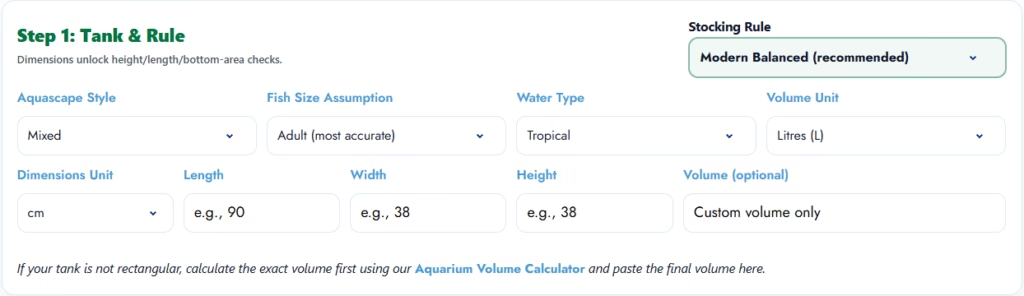
- Enter your tank dimensions for the most accurate result. If you only know the volume, you can use that too.
- Choose your aquascape style, water type, and fish size assumption. Adult size is the safest planning mode.
- Add your filter details, custom LPH, or extra filter support if you use more than one unit.
- Fill optional setup inputs if they apply to your tank, especially temperature, surface agitation, aeration, lid type, plant density, CO₂, feeding, and maintenance consistency.
- Add the fish you already keep or plan to add, along with quantities.
- Run the stocking analysis and review the result in either Simple or Detailed report view.
- Check stocking level, compatibility, filtration, oxygen margin, weekly water change guidance, the main bottleneck, and the recommendations.
- Review the Compatibility Chart, Origin Map, Feed Profile Guide, and Plant Profile Guide if you want a deeper planning view.
- Save or share the result if you want to compare setups or ask for a second opinion.
Tip: If you’re new to stocking, start with the Simple report view first, then switch to Detailed when you want deeper planning sections and guides.
How to Read the Fish Stocking Analysis Results
1) Bioload units
A relative load score based on adult size and waste level. A higher bioload usually means more maintenance and stronger filtration requirements.
2) Stocking level per cent
Shows how close your plan is to the recommended limit for the selected rule:
- Under 80% = usually comfortable
- 80–100% = close to the limit
- Over 100% = higher risk and more maintenance
3) Compatibility score
A quick safety score based on temperament mix and overlap of key ranges (temperature, pH, hardness). Always consider tank layout and individual fish behaviour.
4) Filtration turnover
Your estimated hourly turnover using effective flow, compared with a target that scales with stocking load.
5) Weekly water change
A practical weekly water change suggestion based on stocking level and filtration performance. Heavy feeding or messy fish may need more.
6) Recommended temperature, pH, and hardness
An overlap range based on your selected fish. If overlap is low, the tool warns you because keeping fish outside their range increases stress and the risk of disease.
7) Oxygen margin
This shows how much breathing room your setup has based on tank shape, temperature, water movement, aeration, lid style, and planted-tank conditions. A lower night value is common in planted tanks and matters most in warm or heavily stocked setups.
8) Safety margin
This shows how forgiving the aquarium is if real-life conditions are not perfect. A low safety margin means small mistakes, such as overfeeding, missed maintenance, clogged media, or heat spikes, can quickly push the tank into stress.
9) Swim-zone use
This shows how heavily the available swimming space is being shared by your chosen fish. Even if a tank is acceptable on bioload, the fish mix may still feel crowded if too many species compete for the same zone.
10) Biotope match
This is a supporting indicator showing whether the selected species broadly fit together from a habitat-style point of view. It is not a strict rule, but it helps flag unusual mixes that may need extra care.
11) Bottleneck
The bottleneck tells you what is limiting the setup first. In some aquariums, it will be waste load, while in others it may be oxygen support, filtration, or swimming space. Fixing the main bottleneck usually improves the whole setup faster than making random changes.
12) Recommended next improvements
This section gives practical suggestions based on the result, such as lowering the heaviest waste contributors, improving aeration, increasing flow, or stocking more slowly.
13) Compatibility chart
This gives you a quick visual view of how the selected livestock relate to each other across the current plan.
14) Feed and plant profile guides
These sections help you review feeding style, plant safety, and broader setup suitability in a more practical format.
Always Consider Recommendations & Warnings (if results look risky)
If your plan is over the limit, oxygen is tight, or compatibility is low, these sections matter most.
The Recommendations & Warnings area groups the result into practical sections so you can quickly see what needs attention first, what should be monitored, and what extra context matters before stocking changes are made.
If the result looks risky, these changes usually improve it fastest:
- Reduce 1–2 higher-waste or higher-pressure fish
- Replace aggressive fish with calmer alternatives, or increase the tank footprint
- Improve filtration or add a second filter
- Improve surface movement or aeration
- Increase weekly water changes and feeding discipline
- Re-check after changing only one variable at a time
Common stocking mistakes (and what to do instead):
- Stocking based on baby size → plan using adult size
- Trusting 1 inch per gallon blindly → use it only as a rough comparison
- Using box-rated flow → compare filters using effective flow
- Adding all fish at once → add in stages so bacteria can catch up
- Ignoring temperament → aggression can break a “perfect” stocking number

What Makes This Stocking Calculator Different
Many stocking tools focus on one simple rule. AquaStream is designed as a practical planning tool by checking multiple real-life factors together:
- Bioload-based Modern model using adult size, waste, and behaviour
- Three stocking rule views for context
- Built-in filter support for more realistic turnover planning
- Compatibility scoring plus shared parameter overlap
- Oxygen and setup-stability planning
- Swim-zone pressure and bottleneck detection
- Practical result sections such as charts, profile guides, warnings, and saved/shareable planning
| Method | What It Uses | Best For | Biggest Limitation |
|---|---|---|---|
| Modern Balanced (AquaStream recommended) | Adult size, waste, behaviour, footprint, filtration, oxygen, maintenance | Real freshwater planning | Still needs real observation and water testing |
| 1 inch per gallon | Fish length only | Rough beginner reference | Ignores waste, aggression, filtration, oxygen |
| 1 cm per litre | Fish length only | Rough comparison only | Too simplistic for mixed community tanks |
| Simple fish-per-tank guesses | Tank size only | Very early idea stage | Often unsafe for long-term stocking |
Use it as a smart second opinion, then confirm with real tank observation and water tests. This is why AquaStream recommends using the Modern result first, then checking the classic rules only for rough context.
Modern Rule vs 1 Inch Per Gallon vs 1 cm Per Litre
The “1 inch per gallon” and “1 cm per litre” rules are popular, but they don’t account well for:
- Filtration turnover and real-world flow
- Fish behaviour and aggression
- Adult size impact on waste
That’s why the Modern rule is recommended as the primary result. In this calculator:
- Adult size is used because juveniles grow fast and change the load
- Effective flow is used because real filters rarely deliver full box-rated flow
- Results are meant for freshwater community tanks
- Do note that breeding, high-tech planted tanks, and predator tanks need extra caution
How the Aquarium Stocking Calculator Actually Works
AquaStream does not rely on a single “fish per gallon” rule. The Modern result uses a broader planning model that considers multiple real-world constraints simultaneously.
1) Adult size, waste and behaviour
The calculator uses adult size because juvenile fish grow quickly. Waste level and behaviour matter too, because a ca, lm small schooling fish does not load a tank the same way a messy or territorial species does.
2) Tank dimensions, footprint and swimming space
Two tanks with the same litres can stock differently. Length, width, bottom area, and swimming space all affect how suitable the aquarium is for the species you choose.
3) Effective filtration, not just box-rated flow
AquaStream uses effective flow because real filters rarely deliver their full advertised rate once media, head height, clogging, and maintenance are considered.
4) Oxygen factors: temperature, surface movement, lid, plants and aeration
Warmer water usually gives less oxygen margin. Surface ripple, airstones, open tops, plant mass, floating cover, and CO₂ routines can all change how safe the setup feels in practice.
5) Why can two tanks with the same litres stock differently
A heavily planted open-top tank with strong surface movement may have more breathing room than a warmer tank with a tight lid and weak ripple, even if the listed volume is identical.
Who This Aquarium Stocking Calculator Is Best For
This calculator is most useful for:
- freshwater community tanks
- planted aquariums where oxygen changes matter more at night
- hobbyists comparing filters or planning upgrades
- beginners trying to avoid overstocking mistakes
- fish keepers mixing schooling fish, bottom dwellers, and centrepiece fish
- anyone choosing between “it might fit” and “it will stay stable long term”
It is less suitable for saltwater systems, specialist breeding tanks, and unusual predator setups where species-specific behaviour matters more than any general calculator can safely predict.
Is This an Alternative to AqAdvisor or Similar Tools?
Yes. AquaStream can be used as an alternative to AqAdvisor or as a second opinion when you want a freshwater stocking check based on more than simple fish length.
Like AqAdvisor, it goes beyond basic fish count by considering stocking pressure, filtration, compatibility, and shared water parameters. AquaStream also places stronger emphasis on effective flow, oxygen support, setup stability, swimming-space pressure, and identifying the main bottleneck first.
That makes it especially useful when you want more practical guidance for planted tanks, warmer tanks, mixed community setups, or aquariums that may look acceptable on paper but still become difficult to maintain in real life.
No calculator should replace species research, water testing, and observation. But AquaStream is designed to help you make a better first decision before problems show up in the tank.
Common Stocking Mistakes This Calculator Helps You Avoid
- Stocking by juvenile size instead of adult size
- Trusting 1 inch per gallon as final advice
- Adding too many fish to the same swim zone
- Overestimating filter performance from box-rated flow
- Ignoring aggression and schooling needs
- Forgetting that planted and covered tanks can behave differently at night
- Assuming a “cycled tank” can handle any new stock immediately
A safer aquarium is not just about fitting fish into litres or gallons. It is about building a setup that stays stable week after week.
Frequently Asked Questions (FAQs)
1) Before You Use the Calculator
There is no single safe number for every aquarium. Adult size, waste level, fish behaviour, filtration, oxygen support, and maintenance habits all matter. Use the calculator to test your exact fish list instead of relying on a generic fish-per-gallon rule.
There isn’t one perfect formula. A safer approach is bioload-based planning (adult size, waste, and behaviour) plus filtration and maintenance capacity. Use the calculator as a starting point, then validate with nitrates and fish behaviour.
For most freshwater tanks, yes. The 1-inch per gallon rule is only a rough starting point. It does not account for waste production, aggression, oxygen, footprint, or real filter performance.
Yes. You can use AquaStream’s freshwater stocking calculator online to test fish lists, compare rules, and review practical guidance before buying fish.
It is a planning guide. It can be very useful, but real-life results depend on feeding, plants, filter media, and maintenance.
This calculator is built for freshwater tanks. Saltwater stocking works differently.
2) Tank Types & Use Cases
It can still help, but these fish often need extra caution because they produce more waste, need stronger filtration, or show territorial behaviour. Always treat the result as a planning guide, not a guarantee.
A planted tank can improve stability and reduce nitrates, but it doesn’t eliminate the need for swimming space, aggression, or oxygen. Treat plants as a buffer, not a free pass. If your stocking is near the limit, keep filtration strong and follow the suggested weekly water change.
Use it only as a rough guide. Ponds vary widely depending on plant load, sunlight, temperature swings, and oxygen levels. Treat results as conservative.
Some invertebrates may be listed. Stocking rules and compatibility are focused mainly on fish.
3) Understanding Your Results
Bioload is the waste load your fish produce (waste + uneaten food impact + oxygen demand). Larger and messier fish create a higher bioload, even when the fish count is low.
A good beginner target is 70–80% on the Modern rule. It gives a buffer for mistakes, feeding changes, and real-world filter performance.
There isn’t one fixed number for every tank. This tool scales the turnover target based on your stocking load using effective flow, which is more realistic than box-rated flow.
It depends on adult size, waste level, and behaviour. Enter your tank and your planned fish list to get stocking level %, turnover guidance, and weekly water change suggestions.
Yes. A tank can appear acceptable on stocking percentage but still have a tight oxygen margin, especially if it is warm, heavily planted, tightly covered, weakly agitated, or heavily stocked.
Plants help during the day, but at night they also respire. In planted or CO₂ tanks, nighttime oxygen can become the tighter limiting factor, which is why extra aeration is sometimes more useful after lights out.
Beginners should aim for a comfortable buffer, not just a pass/fail stocking number. A safer setup is easier to manage when feeding changes, filters clog, or maintenance is delayed.
Because the limiting factor is not always fish count. In many tanks, better gas exchange, stronger filter support, steadier maintenance, or lighter feeding improves stability faster than random stocking changes.
No. A calculator helps you plan better, but ammonia, nitrite, nitrate, and real fish behaviour still need to be checked in the actual aquarium.
Simple view is meant for a quicker overview of the most important result sections. Detailed view shows every planning section, charts, and profile guides for a deeper review.
Yes. AquaStream lets you create a shareable result link so you can compare stocking plans, save a setup, or ask for advice using the exact same result.
4) Troubleshooting & Edge Cases
Reduce the load (often by 1–2 higher-waste fish), upgrade the filtration, or choose a larger tank. Over 110% usually means higher risk unless you’re very consistent with maintenance.
Different tools use different models (mass assumptions, waste multipliers, filtration scaling). Use two tools as a cross-check, then trust water tests + behaviour most.
Use the results as a future-safe baseline. This calculator assumes adult size because juveniles grow fast and their waste load rises. If you’re close to the limit now, it often becomes overstocked later unless you upgrade, reduce stock, or improve filtration/maintenance.
Try searching by scientific name first. If it still is not listed, use the closest comparable species for a safer estimate and contact support@aquastream.in with the missing fish details.
No. Filtration supports bacteria and removes particles, but water changes dilute nitrate and dissolved organics. Treat the water-change result as a practical weekly baseline.
About Aquastream
AquaStream is built by hobbyists focused on practical, India-friendly aquarium tools. We update our calculators based on feedback and real-world tank results. Email suggestions to support@aquastream.in.
Professional Aquarium Services in Bhopal & Indore:

Get expert help with custom tank design, maintenance, or aquascaping. Check out our projects and contact us for a free quotation.